

Enterprise Mac Management & Procurement Q&A
04 Feb 2026
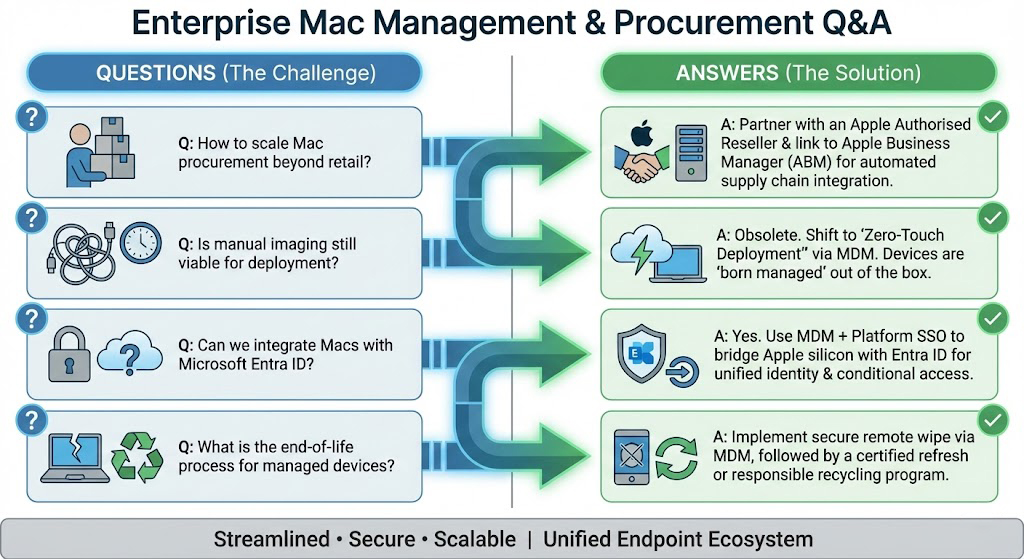
Q: What is the relationship between Apple Business Manager (ABM) and the hardware vendor?
A: Apple Business Manager acts as the trust anchor for your organization’s devices. However, you cannot simply add devices to ABM manually with efficiency. The hardware must be added to your ABM portal at the point of sale via an Authorised Reseller ID.
Imagetext, integrates directly into this supply chain ecosystem. When you procure via Imagetext, devices are automatically populated into your ABM instance. This “chain of custody” allows for Automated Device Enrollment (ADE), preventing users from bypassing MDM profiles and ensuring the device remains under corporate control even if factory reset.
Q: How do we integrate macOS into a predominantly Microsoft (Azure/Entra ID) environment?
A: Modern Mac deployment relies on Platform SSO (Single Sign-On). We move away from binding Macs to traditional Active Directory (which creates keychain issues/sync latency) and toward modern identity management.
Using an MDM solution (such as Jamf Pro)—configured by certified engineers at Imagetext—you can enforce Microsoft Entra ID authentication at the login window. This ensures that a user’s Mac password stays in sync with their cloud identity, facilitating seamless access to Microsoft 365, VPNs, and internal Wi-Fi via certificate-based authentication.
Q: Why should we use an Apple Authorised Service Provider (AASP) for lifecycle management?
A: An AASP provides a closed-loop lifecycle essential for data security and TCO (Total Cost of Ownership) optimization.
1. **deployment:** Validated serial numbers for Zero-Touch.
2. **Maintenance:** Access to genuine Apple parts and proprietary diagnostic tools (GSX) that unauthorized repair shops cannot access.
3. **Decommissioning:** Secure data sanitization and environmentally compliant recycling.
As Auckland’s leading AASP, Imagetext mitigates downtime risks. If a deployment device fails, their direct link to Apple’s Global Service Exchange allows for rapid component replacement or unit swapping, maintaining business continuity in a way standard retail channels cannot.
Q: What distinguishes “Zero-Touch Deployment” from standard setup?
A: In a standard setup, IT staff must physically handle the machine to create admin accounts and install software. This is unscalable and insecure.
Zero-Touch Deployment, orchestrated by Imagetext, leverages the **MDM protocol** to push Configuration Profiles and VPP (Volume Purchase Program) apps over the air.
The Workflow: The employee unboxes the Mac, Connects to Wi-Fi, The Mac checks in with Apple servers, Is redirected to your corporate MDM, Security policies, encryption (FileVault), and software are installed automatically.
The Result: IT never touches the box; the device is compliant within minutes of unboxing.

Contact John Preisig 021965565 or email: John.preisig@imagetext.co.nz
𝗜𝗠𝗔𝗚𝗘𝗧𝗘𝗫𝗧𝗜𝗧𝗦𝗣𝗘𝗖𝗜𝗔𝗟𝗜𝗦𝗧𝗦
Phone +64 9 623 3102
3 Owens Rd, Epsom, Auckland 1023, New Zealand
#AppleAtWork #JamfElite #DeviceManagement #Imagetext #NZTech #EnterpriseIT #EndpointSecurity #DigitalWorkplace #AppleDeviceManagement #AppleForBusiness #AucklandBusiness #imagetext
Share:
Services
More Services
Contact Imagetext
Phone: +64 (09) 623 3102
Level 1, 3 Owens Road,
Epsom, Auckland 1023
New Zealand
Connect With Us