
iCare Managed IT Services
Managed Software Licensing
MDM Solutions
Jamf Device Management
Apple Authorised Service Provider
Apple Premium Technical Partner
Microsoft
Adobe
Forgot your MacBook Password?
28 Jul 2026
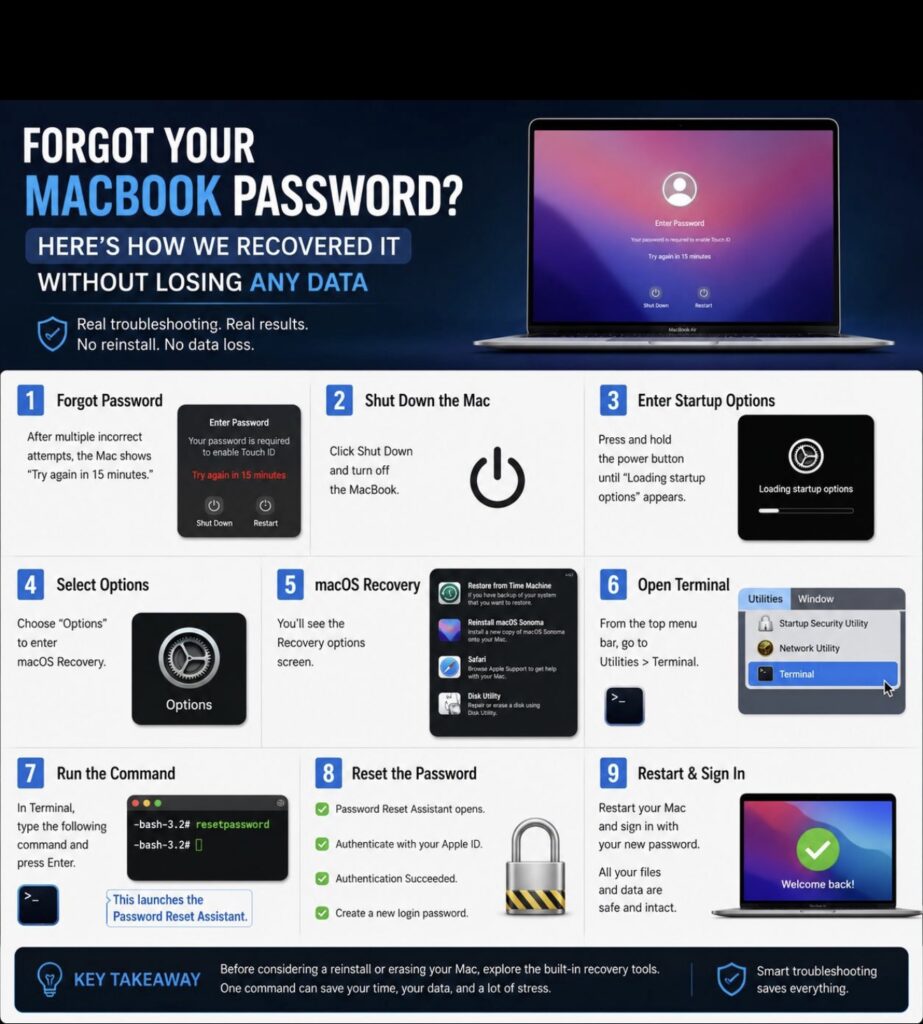
Here’s how to recover it without losing any data…
Most people think forgetting a MacBook password means reinstalling macOS or losing their data.
That isn’t always the case.
Yesterday, I helped recover a locked MacBook Air using Apple’s built in recovery tools without reinstalling macOS and without losing a single file.
The recovery process included:
- Entering Startup Options
- Opening macOS Recovery
- Launching Terminal from the Utilities menu
- Running the built in password reset utility
- Verifying ownership with Apple ID
- Creating a new login password
- Restarting the Mac successfully
This experience reinforced an important lesson.
Effective troubleshooting isn’t about trying random fixes. It’s about understanding the operating system, following the correct recovery process, and choosing the safest solution first.
I hope this guide helps someone avoid unnecessary stress or data loss in the future.
Services
More Services
Contact Imagetext
Phone: +64 (09) 623 3102
Level 1, 3 Owens Road,
Epsom, Auckland 1023
New Zealand
Connect With Us