
Apple Business vs Jamf: how Apple’s new platform fits into your device management strategy
25 Mar 2026
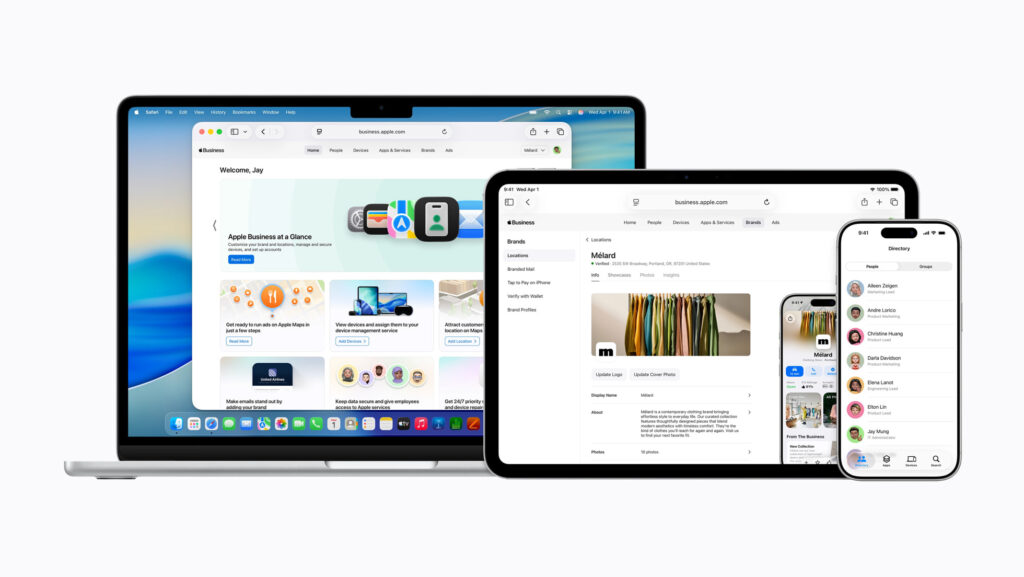
Apple has launched Apple Business in New Zealand – a free, all‑in‑one platform for managing Apple devices, users, apps, business email, and calendar. If you manage Apple fleets today – or sell and support them, like we do at Imagetext – you’re probably asking: where does Apple Business fit if you already use Jamf Pro?
This article explains how Apple Business, Apple Business Manager, and Jamf Pro work together, and when each option makes sense in real‑world IT environments.
The three pillars of Apple device management
When you design an Apple management strategy, you’re really working with three layers:
- Apple Business: A new all‑in‑one platform that combines built‑in mobile device management (MDM), business email and calendar with a custom domain, identity, brand tools, and Apple expert support.
- Apple Business Manager (ABM): Apple’s backend service for zero‑touch deployment, Managed Apple IDs, content and App Store licensing that integrates with any MDM (Jamf, Intune, and others).
- Third‑party MDM (like Jamf Pro): A specialised Apple device management platform that sits on top of ABM and delivers deep control, automation, security, and integrations.
Apple Business is being rolled out globally, including New Zealand, as a free platform for businesses of all sizes. That makes it a natural starting point for Apple‑only organisations that don’t yet have an MDM solution in place.
What Apple Business adds for IT teams
Apple Business is more than another admin portal – it pulls several key capabilities into one service:
- Built‑in MDM with Blueprints: Configure groups of devices with security settings, Wi‑Fi, VPN, apps, and more, using simple, role‑based templates.
- Managed Apple Accounts: Work identities with clear cryptographic separation between work and personal data, integrated with identity providers like Google Workspace and Microsoft Entra ID.
- Business email, calendar, and directory: Apple‑hosted, domain‑based email and calendar, plus a company directory and brand profile integrated into Maps, Mail, Wallet, Siri, and other Apple surfaces.
- Stronger Apple Business Manager foundation: Expanded country coverage, improved automated account creation, and richer device‑management and enrollment options.
Crucially, Apple Business Manager itself is still not a full MDM. It remains the plumbing that supports whichever management tool you choose. The policy engine and day‑to‑day device management come either from Apple’s built‑in MDM inside Apple Business, or from a third‑party MDM such as Jamf Pro.

Where Jamf Pro still stands apart
Jamf Pro remains the benchmark for large‑scale, Apple‑focused endpoint management. It’s the right fit when you need deeper control, automation, and integration than Apple’s native tools provide.
Key differences compared with Apple Business’ built‑in MDM include:
- Depth of control: Jamf exposes a much wider range of macOS, iOS, iPadOS, and tvOS configuration payloads, restrictions, compliance options, and inventory detail than Apple’s built‑in MDM.
- Automation and scripting: Jamf Pro offers powerful scripting, smart groups, policies, and event‑based workflows designed for large fleets and complex environments.
- Integrations and ecosystem: Jamf integrates with EDR and SIEM tools, identity providers, and ITSM platforms, and offers products like Jamf Protect and Jamf Connect for advanced security and authentication.
- Target market and scale: Apple Business Essentials (now folded into Apple Business) has been positioned for small businesses wanting simple, bundled management and support, while Jamf Pro is widely adopted in mid‑market, enterprise, and education deployments that need deep configurability and dedicated IT ownership.
User review platforms and partner guidance consistently describe Apple’s solution as easier to get started with, while Jamf is seen as more powerful once you invest time in configuration and integration.
Apple Business MDM vs Jamf Pro: side‑by‑side
Here’s a practical view of how Apple Business’ built‑in MDM compares with Jamf Pro:
| Area | Apple Business (built‑in MDM) | Jamf Pro (with ABM) |
| Zero‑touch deployment | Uses Apple Business / ABM for automated device enrollment and setup. | Uses ABM integration to drive rich zero‑touch workflows and policies. |
| Policy depth | Core security and configuration via easy‑to‑use Blueprints. | Very granular profiles, scripts, smart groups, and compliance policies. |
| Identity | Managed Apple Accounts and built‑in IdP integration. | Integrates with IdPs and adds Jamf‑specific auth/SSO and onboarding flows. |
| Email / calendar | Apple‑hosted business email and calendar using your own domain. | Uses your existing mail stack; Jamf doesn’t bundle email or calendar. |
| Apps & content | App assignment and management via Apple Business and ABM. | Rich app deployment, patching, and self‑service app catalog. |
| Support | Apple expert support plus AppleCare+‑style business options. | Jamf support and partner ecosystem; no AppleCare bundling. |
| Best fit | Small to lower‑mid Apple‑only businesses that want simplicity. | Mid‑market, enterprise, and education fleets with complex needs. |
What should IT managers in New Zealand do next?
For New Zealand organisations, Apple Business changes the entry‑level story more than the enterprise story.
- New or smaller Apple‑only environments: Apple Business can be your primary platform. You get free device management, identity, email, calendar, and brand tools from a single vendor, with minimal setup overhead.
- Growing or regulated environments: Apple Business Manager plus Jamf Pro will remain the preferred model, with Jamf as the system of record for policies, automation, security posture, and integrations.
- Mixed strategies and future‑proofing: In every case, Apple Business Manager stays at the core for zero‑touch deployment, Managed Apple IDs, and app licensing, regardless of which MDM you layer on top.
At Imagetext, we see Apple Business as a powerful on‑ramp for smaller Apple‑centric organisations – and Jamf Pro as the right tool when you need to go further with security, automation, reporting, and integration across your wider stack.
Contact John Preisig 021965565 or email: John.preisig@imagetext.co.nz
Contact Mike Scragg 0218373727 or email: mike.scragg@imagetext.co.nz
Contact Kelly Wang 0211263895 or email: kelly.wang@imagetext.co.nz

𝗜𝗠𝗔𝗚𝗘𝗧𝗘𝗫𝗧 𝗜𝗧 𝗦𝗣𝗘𝗖𝗜𝗔𝗟𝗜𝗦𝗧𝗦
3 Owens Rd, Epsom, Auckland 1023, New Zealand
#AppleAtWork #JamfElite #DeviceManagement #Imagetext #NZTech #EnterpriseIT #EndpointSecurity #DigitalWorkplace #AppleDeviceManagement #AppleForBusiness #AucklandBusiness #imagetext #EUC
CODE: MRFSAAS
Services
More Services
Contact Imagetext
Phone: +64 (09) 623 3102
Level 1, 3 Owens Road,
Epsom, Auckland 1023
New Zealand
Connect With Us