|
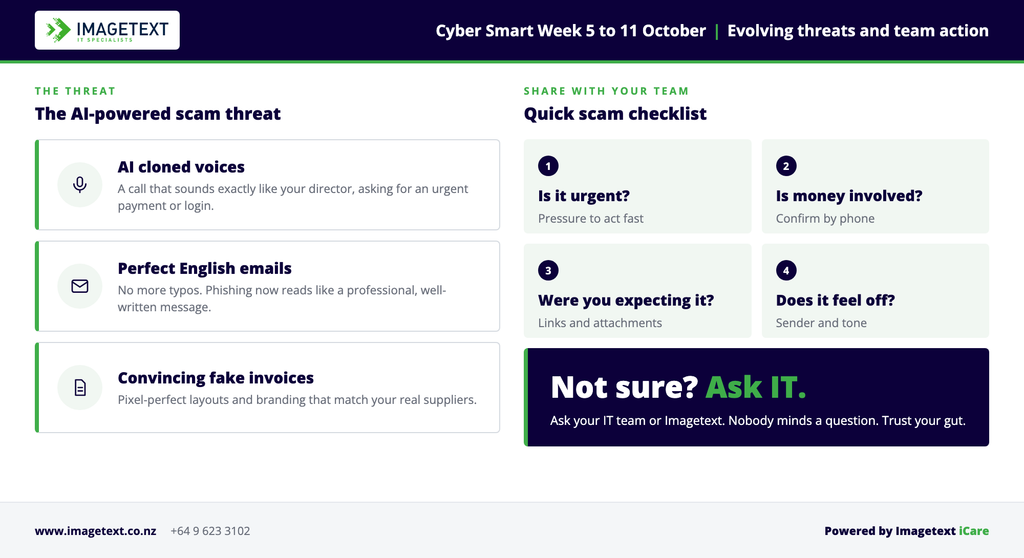
Scams are getting harder to spot. AI now writes emails with no spelling mistakes, clones voices and builds convincing fake invoices in minutes. The National Cyber Security Centre (NCSC) says so itself, and it’s the reason this year’s Cyber Smart Week theme is “find a scam before it finds you”.
Cyber Smart Week runs from 5 to 11 October 2026. It’s New Zealand’s annual awareness campaign, and it’s free to take part.
| |
NCSC Deputy Director-General Catriona Robinson puts it simply: people are our strongest line of defence. Her advice for organisations is just as direct. Don’t wait until another business loses data, money or its reputation. Get the basics in place now.
|
Here are those basics, and how to check yours this week.
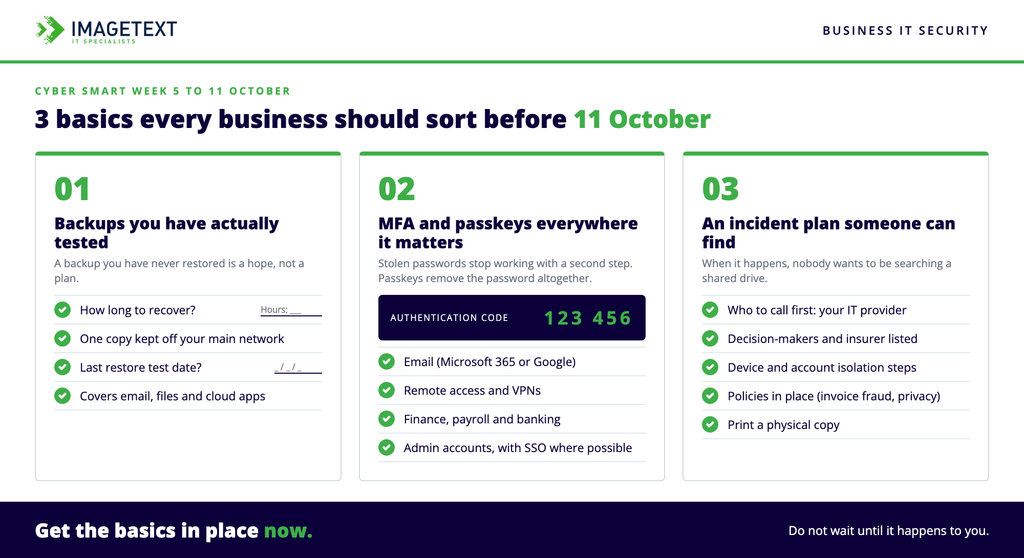
1. Backups you’ve actually tested
Most businesses have backups. Far fewer have restored from one.
Ask yourself:
- If every device was locked tomorrow, how long until we’re working again?
- Is at least one copy kept away from our main network, where ransomware can’t reach it?
- When did we last try to restore a file, a mailbox or a whole machine?
If you can’t answer those quickly, that’s your first job this week.
2. Multi-factor authentication and passkeys everywhere it matters
A stolen password is the most common way in. Multi-factor authentication (MFA) stops most of those attempts, because the attacker also needs a second check that only you have.
Use passkeys when you can. They replace the password completely with a sign-in that’s tied to your device and unlocked with your face, fingerprint or PIN. That leaves no password to steal, and nothing to type into a fake login page.
Turn on MFA for:
- Email (Microsoft 365 or Google Workspace)
- Remote access and VPNs
- Finance, payroll and banking systems
- Admin accounts on everything
- Use single sign-on (SSO) where possible
Wherever passkeys are offered, use them instead of a password and code, starting with email and admin accounts.
Both take minutes to set up, and they’re the cheapest protection a business can buy.
3. An incident plan someone can find
When something goes wrong, nobody thinks clearly. A plan written in advance means you don’t have to.
Keep it to one page:
- Who to call first, including your IT provider
- Who makes decisions, and who talks to staff and customers
- How to isolate a device or account fast
- Who you need to notify, including your insurer
- Do you have policies in place, e.g. an invoice fraud policy and a privacy policy?
Print it. If it only lives on the server that’s been encrypted, it won’t help.
Don’t assume your Macs are secure
Plenty of businesses run Macs and assume they’re safe. Attackers go after people, not operating systems, and a phishing email works the same on any device.
At Imagetext we look after Mac, Windows and mixed environments every day. Our approach is layered:
| Device management enforces security settings, encryption and updates across your device fleet. |
| |
| 24/7 detection and response for security threats on your devices and your identity. |
| |
| Endpoint protection for your devices, backed by real people and AI. |
All of it sits inside our iCare managed IT service at fixed monthly pricing, so there are no surprise bills when something needs attention.
A quick scam checklist for your team
Share this with staff during Cyber Smart Week:
- Is it urgent? Pressure to act fast is the biggest warning sign.
- Is money or bank detail involved? Always confirm changes by phone, using a number you already have.
- Did you expect it? Be wary of unexpected links, attachments and login pages.
- Does something feel slightly off? The sender’s address, the tone, the timing. Trust that feeling and ask.
- Not sure? Don’t click. Ask your IT team or Imagetext. Nobody minds a question.
|